Content and pages
Create, preview, structure, and update the pages your team needs as the business changes.
 Start a project
WebX · AI-enabled CMS for growing businesses
We build sites on WebX, a flexible CMS for small and midsize businesses. Run pages, catalogues, SEO, languages, and site structure from one admin panel; connect an AI client through MCP to prepare and update work in drafts, then decide what goes live.
One place to run the site
WebX brings the everyday work of running a site into one clear system: people have a practical admin panel, while an AI client can work through the same permissions, drafts, and review steps. These are real screens from our demo site.
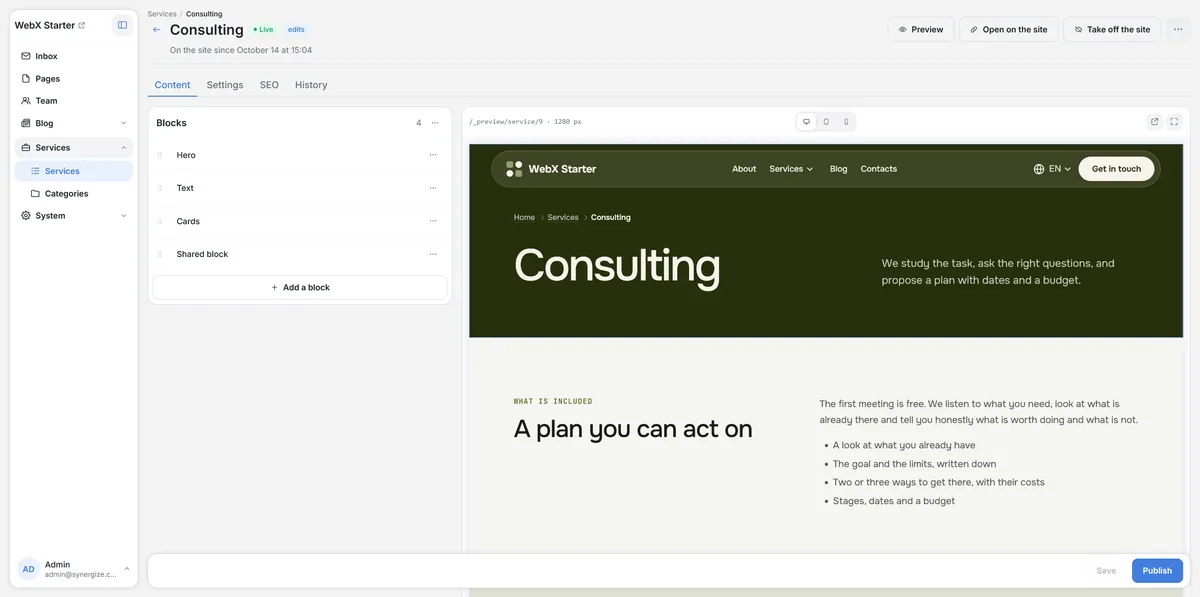
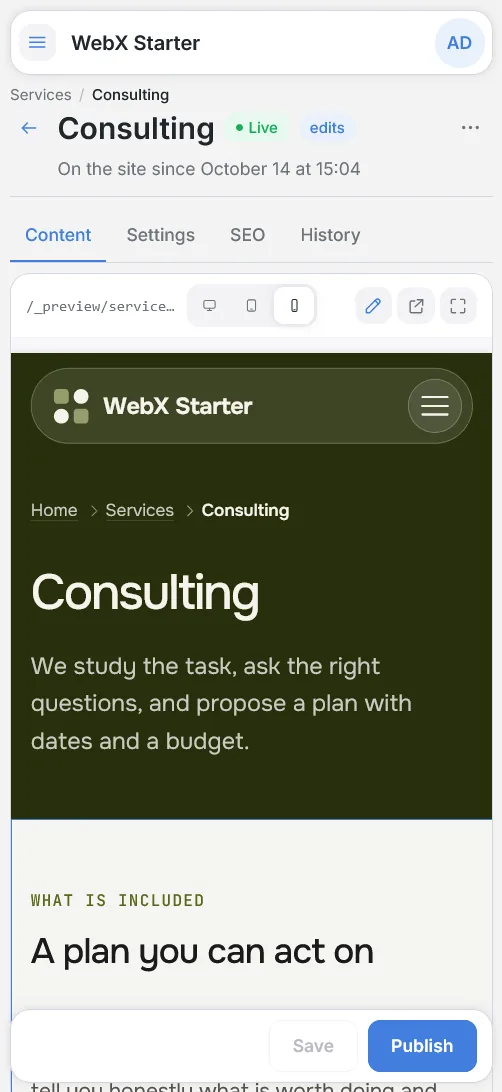
The WebX admin panel on desktop and mobile. An AI assistant has saved a new service lead as a draft; the live site keeps the published text until someone publishes the change.
Connected through MCP, it reads the site’s content rules, runs a dry run to check exactly what would change, and saves the edit as a draft.
The page is marked as having edits. The preview shows the new text, while visitors still see the published version.
Publishing is a separate step. Every published version stays in the history and can be restored, and earlier drafts are kept too.
Recorded on our WebX demo site in October 2026 with demo content only. Screens are cropped, not edited. Select a screenshot to enlarge it.
Built for growing businesses
WebX is part of a website we build around your operation—not a self-serve subscription. Start with the sections you need, then adapt the system as content, products, and workflows become more complex.
Create, preview, structure, and update the pages your team needs as the business changes.
Manage products, properties, stock, filtered landing pages, and product information in one place.
Keep SEO fields, addresses, redirects, menus, and sitemaps accurate as the site grows.
Connect an AI client through MCP to prepare content, format updates, and work with the same controlled workflow as your team.
The problem
The website launches, and then every update depends on someone finding time to do it by hand.
Articles, product cards, translations, and seasonal updates pile up because someone has to sit in the admin panel and do them by hand.
Teams already draft with AI assistants, then copy and paste the result into the site field by field. The slowest step is still manual.
A conventional CMS has no safe way to let an assistant work inside it: no scoped access, no preview of a change, no record of what it did.
How it works
The parts of the site you allow an assistant to access are available through the same rules and review step.
In plain language, in the AI assistant you already use: “Write an article on spring maintenance and add it to the blog as a draft.”
Before writing, it reads your site’s languages, tone of voice, what never to say, and what already exists, so it reuses rather than duplicates.
Every change can run as a dry run: the system reports exactly what would happen, without changing anything.
Content lands as a draft or a new version. The live site does not change until someone publishes.
You check the result in the same admin panel your team uses, edit if needed, and publish—or ask the agent to revise.
Each change is kept in the history with its author, so you can see what the agent did and restore an earlier version.
What it does for you
Draft, structure, and update articles in every site language, with internal links and SEO fields filled in.
Create and update products, properties, and stock, or import a supplier spreadsheet and review the result.
Run a site audit, review the issues, and fix titles, descriptions, redirects, and broken links.
Bring pages, products, and articles into the other languages of the site, following the same tone rules.
Read incoming form submissions, sort them by status, and prepare a summary for the team.
Update banners, menus, FAQs, team profiles, vacancies, prices, and events without opening a ticket.
You stay in control
The agent can do only what you allow, in the sections you allow, and every change is visible. Start with drafts; widen access when the results earn it.
Each agent key can read or write only the sections you choose. Read-only for the catalog and write access to the blog is a normal setup.
Agent access is created and revoked in the admin panel. Remove a key and the agent loses access immediately.
Changes can be previewed as a dry run, so you see the effect before anything is saved.
Agents work in drafts and versions. Publishing stays a deliberate step, and earlier versions can be restored.
The history shows who changed what and when—a person or an agent—so nothing happens silently.
Languages, tone of voice, and forbidden claims are stored once in settings and read by the agent before it writes.
Not sure how much to delegate? Read how to choose the first job for an AI agent. WebX can support a custom website, an e-commerce catalogue, or ongoing SEO and growth work.
How it compares
Choose based on the parts of the site an assistant can reach, whether you can preview a change, and what record it leaves—not simply whether a platform has an AI feature.
| WebX | WordPress | Shopify | Webflow | Directus | Contentful | |
|---|---|---|---|---|---|---|
| What an agent can work with | Every section of the site: pages, blocks, blog, catalog, SEO, forms, menus, media, and settings | WordPress.com and Jetpack-connected sites: posts, pages, comments, categories, tags, and media. Other self-hosted sites: only what installed plugins expose | Official servers cover shopping carts, store policies, and developer docs; editing the store admin needs a third-party server | Design, pages, assets, and existing CMS items; cannot create new localized CMS items | Collections, items, files, field definitions, comments, and configured flows in the connected Directus project | Entries, assets, content types, releases, locales, tags, and AI Actions in connected spaces and environments |
| How it is enabled | Built in; agent access is created in the admin panel | WordPress.com paid plans, or Jetpack AI or Complete on self-hosted sites. Otherwise: MCP Adapter plugin plus plugins that register abilities | Built-in Sidekick assistant inside Shopify; external agents through third-party servers | Official MCP server, authorized per workspace | Native MCP server connected to a Directus project with a user token or login | Remote MCP uses OAuth plus an MCP-app allow-list per space and environment; local MCP uses a personal access token |
| Preview before saving | Dry run for every change: the result is reported, nothing is saved | WordPress.com: the agent describes the change and asks for approval. Self-hosted: not provided | Depends on the third-party server | Isolated page branches on Enterprise plans | No standard MCP dry run; use the project’s own publishing and review workflow | Content Preview API for unpublished content; releases can be validated before publishing |
| Access control | Read or write access per section, per agent key | WordPress.com: roles plus per-operation switches. Self-hosted: permission checks written by developers | Admin API token scopes, such as product write access | Existing Webflow roles, one workspace per authorization | Role-based permissions, including granular controls for collections and fields | A user’s Contentful permissions plus a remote MCP allow-list for each space and environment |
| Drafts and recovery | Drafts and versions with restore | WordPress.com: new posts default to draft; trash kept for 30 days | Depends on the third-party server | Page branches on Enterprise plans | Unpublished content versions can be compared with the main version; item revisions record changes | Draft state, published-entry snapshots, and releases that can be validated before publish |
| Record of agent actions | History of every change, by a person or an agent | WordPress.com: Activity Log. Self-hosted: requires a logging plugin | Depends on the third-party server | Not described in the documentation | Activity and revision records are linked to the Directus user making a change | Entry versions record published changes; the MCP documentation does not describe a separate agent-action log |
| Hosting | Built on open-source packages; can run on your own server | Any host, or WordPress.com | Hosted by Shopify | Hosted by Webflow | Directus Cloud or self-hosted | Hosted Contentful SaaS |
Based on public documentation, last checked in October 2026. Self-hosted WordPress depends on the plugins installed, and all platforms change quickly. Sources: WordPress.com MCP server documentation; WordPress MCP Adapter review (InstaWP); WordPress.com MCP write capabilities (The Next Web); Shopify MCP guide (Gamut); Webflow MCP server documentation; Directus MCP and platform documentation; Contentful MCP server documentation.
What is inside
Each site gets only the sections it needs. Every section is available to people and to AI agents alike.
Pages built from reusable blocks, blog, media library, menus, FAQ, press, and events—so your team updates the site itself, in every language.
A full catalogue—categories, brands, properties, stock, filtered landing pages, pricing plans—so products and prices stay current in one place.
SEO addresses, redirects, sitemap, and a built-in site audit, plus banners and reviews—so search basics stay correct as the site grows.
Form inbox with notifications, tasks, services, team profiles, and vacancies—so enquiries and routine pages are handled where the site is managed.
Roles, AI agent access, languages, and site-wide settings—so you decide who and what can change which part of the site.
Catalog import and export, redirect import, image optimization, backups, and site health checks—so the site stays fast, safe, and easy to move or restore.
Built for people, too
Trust and ownership
Short, factual answers to the questions teams ask before giving anyone—or any AI—access to their site.
Not available yet. Sign-in uses an email and password; two-factor authentication and single sign-on are not available yet. We do not hold security certifications such as SOC 2 or ISO 27001.
Ask us a technical or security questionCommon questions
Assistants that support the Model Context Protocol (MCP), such as Claude, ChatGPT, and a growing number of other tools. You use the assistant you already have; the site provides the connection.
The agent gets only the access you grant, section by section, and you can revoke it at any time. It works in drafts, can preview changes as a dry run, and every change is recorded in the history. Publishing remains your decision.
No. The admin panel is a complete content management system for people. AI access is an option you switch on when it is useful.
The admin panel includes step-by-step instructions. Connecting an assistant takes a few minutes and does not require a developer.
No. It is the system your website is built on. You order a website from us, and this is how you and your AI assistant manage it after launch.
It depends on the scope: the sections you need, the design, integrations, and content. We propose a scope and estimate after a short conversation about your business.
Start with the problem
We will recommend a starting point.
Discuss your project